The schedule shows every job. Dashed amber cards still need a cleaner; solid cards show the cleaner's colour on the left edge.
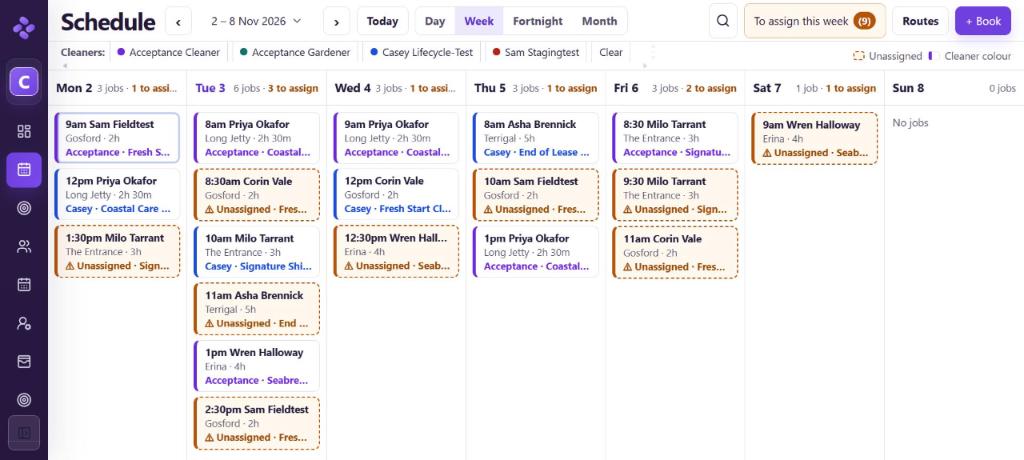
The toolbar
- ‹ › and Today move between periods; click the date to pick any day.
- Day, Week, Fortnight, Month switch the view.
- Search (magnifier) finds a job by client, address or service.
- To assign this week (n) opens a tray of jobs and ready-to-book quotes that still need a cleaner or a time.
- Routes plans driving for the day.
- + Book opens the Book window.
- Cleaners: click a name to show only their jobs; Clear shows everyone.
Reading a card
Each card shows the time and client on line 1, suburb and duration on line 2, and the cleaner and service on line 3. "⚠ Unassigned" means nobody is booked yet. A ✓ means the job is done. Click a card for details, Edit schedule or Open full job.
The views
- Day: a board with one row per cleaner and an Unassigned row on top. Drag a job onto a cleaner to assign it. Show all cleaners adds people with no jobs that day.
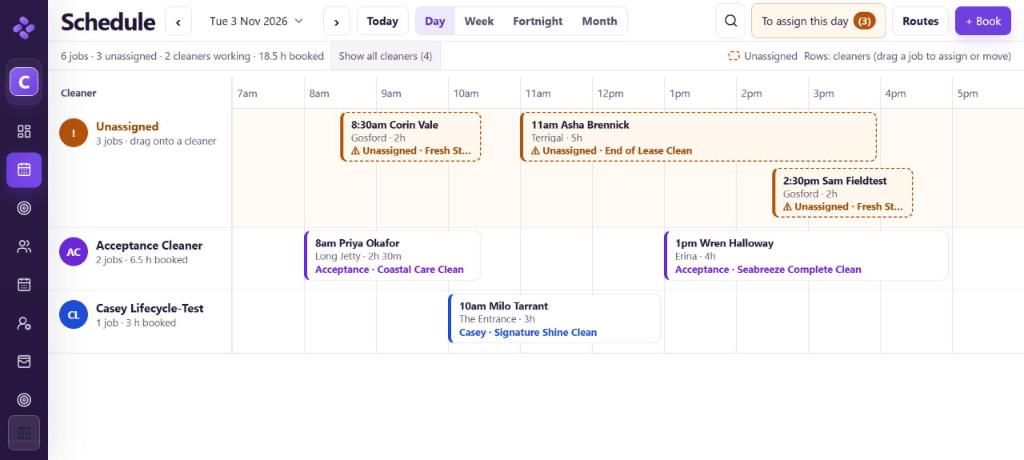
Day board - Week: each day is a list of cards in time order. The day heading shows "n jobs · n to assign".
- Fortnight and Month: up to three jobs per day, then "+n more" (click it to open that day). Faint Planned cards are future repeat dates that aren't booked yet; Paused shows a paused repeat.
Keyboard shortcuts
← / → previous or next · T today · D day · W week · F fortnight · M month