Everything starts from Today, and the menu on the left takes you to each area.
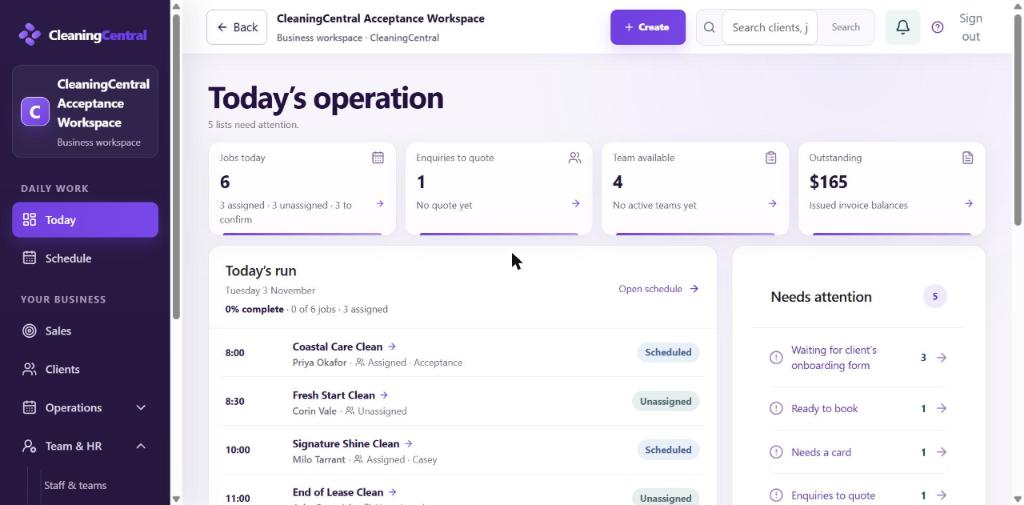
The menu (left)
| Menu item | What it's for |
|---|---|
| Today | What needs doing now: today's jobs, enquiries to quote, outstanding money, and Needs attention |
| Schedule | The calendar: book, assign and move jobs |
| Sales | Enquiries and quotes |
| Clients | Every client file |
| Operations | Cover & swaps, Quality inspections, Open incidents and client requests |
| Team & HR | Staff & teams, HR & recruitment, Payroll & timesheets |
| Close & invoice, Invoices | Finishing jobs, invoicing and payments |
| Reports | How the business is going |
| Marketing | Your website and campaigns |
| Settings | How your workspace is set up |
| Help & training, Contact support | These articles, the AI assistant, and a person |
The bar along the top
- Back returns to the last screen.
- + Create starts a new client, enquiry, quote or job from anywhere.
- Search finds clients, jobs, quotes and invoices by name, number, address or phone.
- The bell shows reminders and client messages. A red number means something is waiting.
- ? opens help for the screen you're on.
Today, in more detail
- The tiles (Jobs today, Enquiries to quote, Team available, Outstanding) each open the full list.
- Today's run lists today's jobs in time order, with who is assigned.
- Needs attention is your to-do list: quotes waiting for the client's onboarding form, quotes ready to book, clients who need a card, enquiries to quote, reminders due, and invoices to approve.
- Work to close and invoice counts jobs not completed, completed but not invoiced, and invoiced but not sent.