The booking window shows Card needed when your payment rules say this client must save a card before the job is booked. The message names the rule, for example "your rule: jobs over $500 need a saved card".
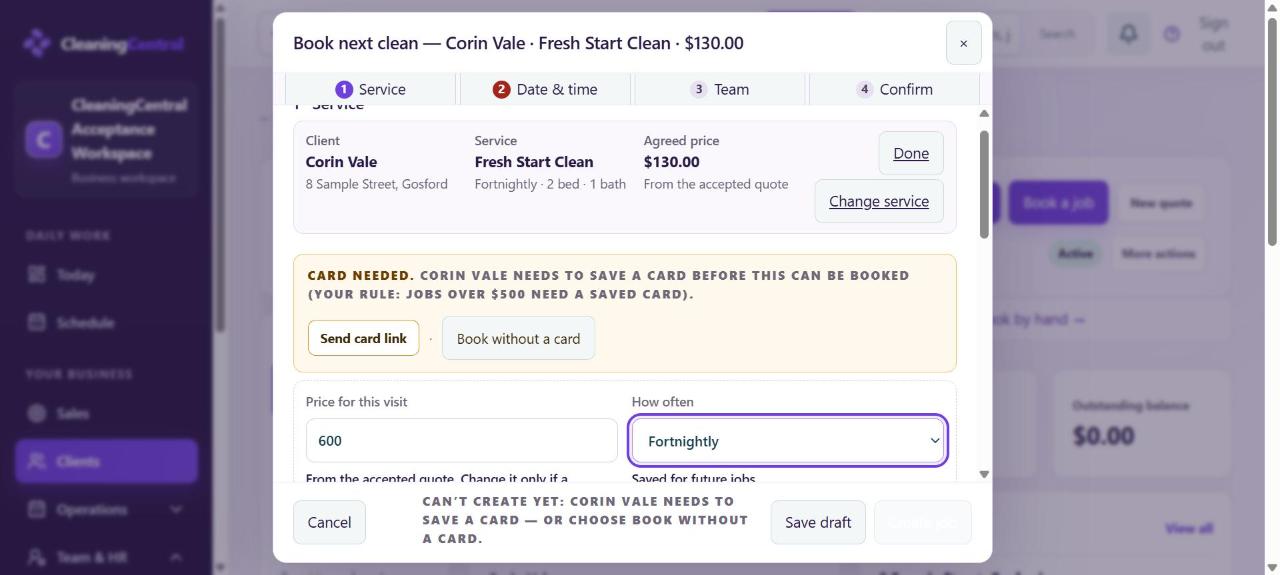
Choose one
- Send card link: the client gets a secure Stripe link to save a card or bank account. Once they do, book the job.
- Book without a card (owner and administrator): type a reason (for example "regular client, pays on invoice"). It's saved on the client file. Tick Don't ask again for this client if it always applies.
- Change the rule (owner only): Settings → Connections → Payment rules → Require a saved card or bank account. Choose Never, Only for jobs over $…, Only for a new client's first job over $… or Always, then Save payment rules.
"Prepayment needed"
This is a separate rule: a deposit or prepayment for jobs over a set value (Payment rules → 02 Deposits and prepayments). Check the dollar amount; a threshold such as $4 catches almost every job.
Still stuck?
If an administrator can't open Payment rules, only the workspace owner can change them. See "That page isn't available for your role".